How we work is a discipline.
This is where we teach it.
Reference handbooks, worked cases, and certification for the practices that define Right Click — starting with how we direct agentic tools on client systems.
Agentic Operations
The Attending model: directing an AI technician through the ADM control plane. Roles, scope classes, casework, and certification.
Physical Infrastructure
Layer 1 data cabling standards and rack build practice. Existing documentation moves in here next.
Certification levels
Every subject uses the same ladder. Levels are earned per subject, not site-wide.
| Level | Name | How it's earned |
|---|---|---|
| 1 | Foundations | Read the handbook. Pass the knowledge check. |
| 2 | Practitioner | Pass the judgment assessment — scenario questions where several answers are defensible and one is best. |
| 3 | Attending | Judgment assessment plus a real case, attended live, reviewed and signed off by a senior engineer. |
The engineer moves up a seat.
In MSP work the root cause is usually the thing that gets abandoned — not because engineers don't care, but because the ticket has to close and the queue moves on. This model makes depth affordable enough that root cause stops being optional. Speed is the mechanism. Comprehensiveness is the product.
Three layers of protection, working together
The Attending
You. Owns the question being asked, the scope, every authorization, and whether a conclusion is accepted. Owns the client relationship and the risk decision.
Right Click ADM
Identity and MFA. Session expiry. Read-only vs change classification. Purpose-logged audit trail. Refuses to act without a human.
The agentic technician
Claude. Hypotheses, tool calls, forensic depth, drafting. Trained to push back, respect stated scope, and surface what it cannot prove.
No single layer is trusted alone. The model can be confidently wrong; the control plane is v0.6; the human can be tired. Defense in depth is the point.
Scope of impact
Every action in a session has a reach. Classify it before you authorize it.
What actually changes
| Traditional workflow | Attending workflow |
|---|---|
| You RDP in and click through Task Manager, Autoruns, Event Viewer | You state the question; hundreds of checks run in parallel and report back |
| You check the persistence locations you remember | All eight autostart surfaces get checked every time, consistently |
| Depth is limited by the time you personally have | Depth is limited by what the evidence supports |
| "Defender says clean" becomes the answer | "Defender says clean" becomes a data point to explain |
| Root cause is elusive; escalation or the queue kills it | Root cause work happens inline, in the same session |
| Findings live in your head and a short ticket note | Findings are captured, hashed and written up as you go |
The Attending
Borrowed deliberately from medicine. The attending physician doesn't run the labs or take the blood: they hear the presentation, form a differential, ask what would rule a diagnosis out, accept or reject the resident's assessment — and sign the chart, which means they own the outcome.
That is this seat, line for line. The technician is genuinely capable and occasionally confidently wrong — usually early, when it's reasoning from pattern rather than evidence. Your job is to notice when a claim is a prior rather than a finding, and to push for the artefact.
What you own
- The question. Not "have a look at this" — the operational question you actually need answered. Can I un-isolate and hand this back? produced a useful investigation; is this bad? would not have.
- The scope. Set it explicitly, early, in writing. It will be respected literally — say "this machine only" and mean it. Equally: if you want the estate swept, you have to say so.
- Every authorization. You are the credential. Nothing reaches a client endpoint you didn't personally authenticate for.
- Accepting or rejecting conclusions. A conclusion that survives "what would disprove this?" is worth acting on.
- The client relationship and the risk decision. Clean vs reimage, notify vs monitor, the client's risk appetite — these are never the technician's call.
Two credentials, one posture
Anyone can initiate; approval escalates with reach. An Attending Technician is never blocked from proposing wider work — the case shouldn't stall because the person who found the problem holds the junior credential. What escalates is who has to approve it: the MFA push routes to someone credentialed at the work's class.
| Work class | Who can initiate | Who the MFA approval goes to |
|---|---|---|
| Class 1 Single endpoint | Any attending | The initiating attending approves solo |
| Class 2 Site / client | Any attending | An Attending Engineer — for a technician-initiated case, that's a second person reviewing the scope before it fires |
| Class 3 Fleet / multi-client | Attending Engineer | A second Attending Engineer — four-eyes, no exceptions. Nobody authorizes fleet-reaching work alone, including seniors |
Same discipline at every level; the difference is how many sets of eyes an authorization needs before it reaches a client system. The Class 3 rule exists precisely for the day the person being second-guessed is you — urgency and seniority are both things an attacker can wear.
What this seat is not
- Not a promotion or an org-chart title — it's the seat you occupy on a case. "Today you're attending on the Tivoli incident."
- Not hands-off. You read the artefacts. You challenge. You correct the record when a conclusion changes — in both directions.
- Not faith in the tool. An AI that revises its own earlier advice is doing the job properly. An attending who never catches it isn't.
The Control Plane Right Click ADM v0.6
Agentic Device Management — the successor category to MDM and RMM. ADM is the layer between the technician and every client endpoint. It decides what's allowed; it is not the thing doing the work.
What ADM enforces today
- No standing access. Working sessions expire every 240 minutes. There is no persistent credential.
- A human is the key. Authorization requires the attending, in a browser, with Microsoft sign-in and Authenticator number-match. The approval page states exactly what is being authorized. The link cannot be actioned by the AI — that is the design intent, stated in the refusal itself.
- Read-only vs change classification. Read-only calls run freely inside a session. Anything that changes the system is gated separately and must carry an explicit confirmation.
- Purpose on every call. Every tool call carries a stated purpose, which becomes the audit trail.
Where it's going
The control plane is on the same least-privilege journey we preach for client networks — lateral-movement limits, but for the agent:
- Per-site session credentials: an approval scoped to one client, not the fleet.
- Least-privilege identity for the AI, exactly as for human identities.
- Class-routed approvals: Class 2 work pushes its MFA approval to an Attending Engineer; Class 3 pushes to a second Attending Engineer. Trained as procedure today; this is the enforcement.
Version and capabilities on this page are updated as ADM develops. If what you see in a session doesn't match this page, believe the session and flag it.
The Agentic Technician
Claude, doing the hands-on work: hypotheses, tool calls, forensic correlation, reverse engineering, drafting the deliverable — and surfacing what it cannot prove.
What it's genuinely good at
- Breadth without fatigue: all eight persistence surfaces, every time; 1,063 files hashed without complaint.
- Depth that used to be an escalation: payload decryption and classification inline, in minutes.
- Correlation across artefacts: a directory created 48 seconds after a paste; an analytics record eight seconds after a command.
- Honest bookkeeping: purposes stated, evidence hashed, rollback documented as it goes.
Where it fails, and how
- Confidently wrong, early. Pattern-based priors presented with the same fluency as findings. In the Tivoli case it assumed credential theft before reading the payload — and was wrong.
- It cannot prove a negative. It will say so; make it say so.
- It respects scope literally. Which means an unstated scope is an undefined one. State it.
- Injection is real. Artefacts you paste can carry instructions aimed at the technician. This is a reason for the control plane and for Class 3 paranoia, not a reason to paraphrase artefacts — raw artefacts still win.
Model selection
Match the model to the cost of being wrong, not the prestige of the task.
| Model | Use for | Notes |
|---|---|---|
| Opus 4.8 | Deep cybersecurity and forensic work: incident response, reverse engineering, ambiguous multi-step diagnosis | The default for Tivoli-class work, where a wrong confident answer is expensive |
| Fable 5 | The hardest reasoning tasks | Most capable overall; ships with dual-use safeguards that can intercept some cyber requests. Try it first on hard problems; fall back to Opus if it hesitates on legitimate IR work |
| Sonnet 4.6 | The daily workhorse: routine tickets, scripting, documentation, first-pass triage, general-IT cases | Most ticket volume belongs here. Don't burn Opus on password resets |
| Haiku 4.5 | Volume and speed: log summarization, alert-batch classification, ticket notes, quick lookups | Anywhere you'd accept an intern's first draft |
Three cases, three arguments
Every case here follows the same skeleton: the facts, why it's worth teaching, the moments that mattered, root cause, outcome, and — always — the honest limits. Kept specific, mistakes included, because removing them would turn training into marketing.
Tivoli Lighting
ClickFix malware, one session, ~45 minutes. Every conventional check had come back clean; the malware was still on disk. The auth-gate centerpiece.
Buccola Landscape
A reboot request that uncovered a credential-spraying attack running for at least two years. Proof this is not only a security discipline.
OCIP
Multi-day, multi-person response to a RAT and a rogue Domain Admin session. The team-scale case — including ten findings against ourselves.
Next case
One or two further cases are being written up to the same skeleton.
Tivoli Lighting: the case that was already "closed"
ClickFix malware delivery via a paid Google ad. Every conventional check had been run and had come back clean — Defender full scan, System Restore, password reset, sessions revoked. On paper: done. In reality: the malware was still on disk, the root cause was unknown, and nobody knew whether data had left the building.
Refs: RocketCyber #12635280 / #12635281 · 12 Aug 2026 · one session, ~45 minutes · single attending, single endpoint · Source: the Tivoli case study document.
1 — Intake: frame the question, paste the raw artefact
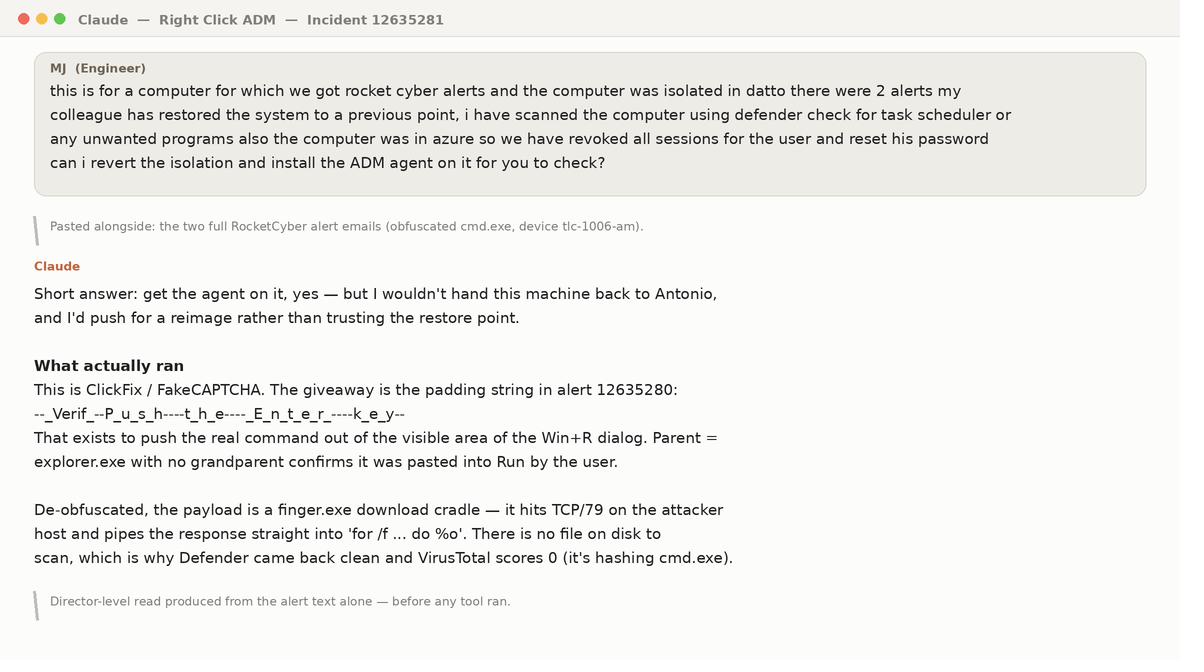
The engineer didn't ask "is this bad?" He described what had been done and asked: can I un-isolate and hand this back? And he pasted both complete alert emails. The padding string in the pasted command — the single most diagnostic detail — would have died in a paraphrase.
2 — The control plane asserts itself
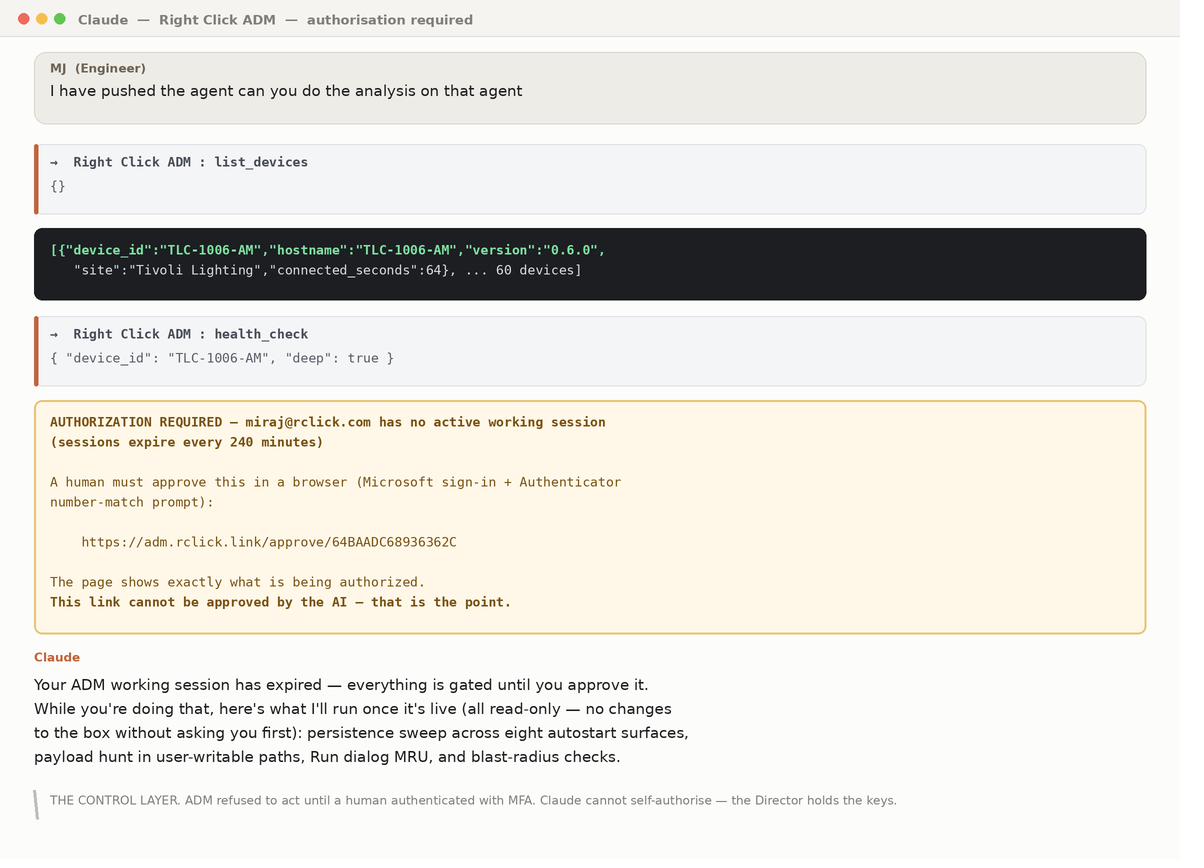
The first real action was refused — not by the technician, by ADM. Sessions expire every 240 minutes; approval needs a human, a browser, and number-match MFA. When a client asks whether we let an AI loose on their machines, this is the answer.
3 — Discovery: what the scan missed Class 1 · read-only
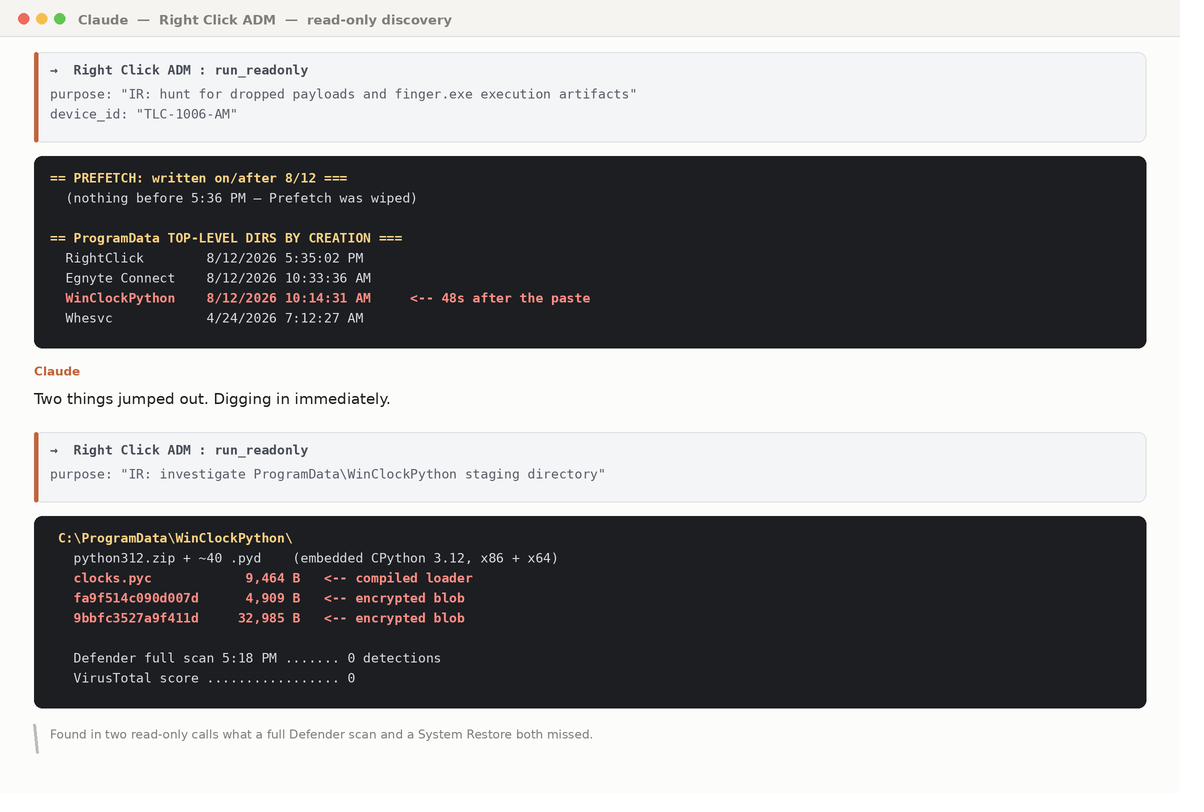
Directory creation times correlated against the known execution time: a folder born 48 seconds after the paste, named to look like a Windows component. An empty Prefetch directory was itself evidence — proof the System Restore had destroyed execution history.
4 — Reverse engineering, inline
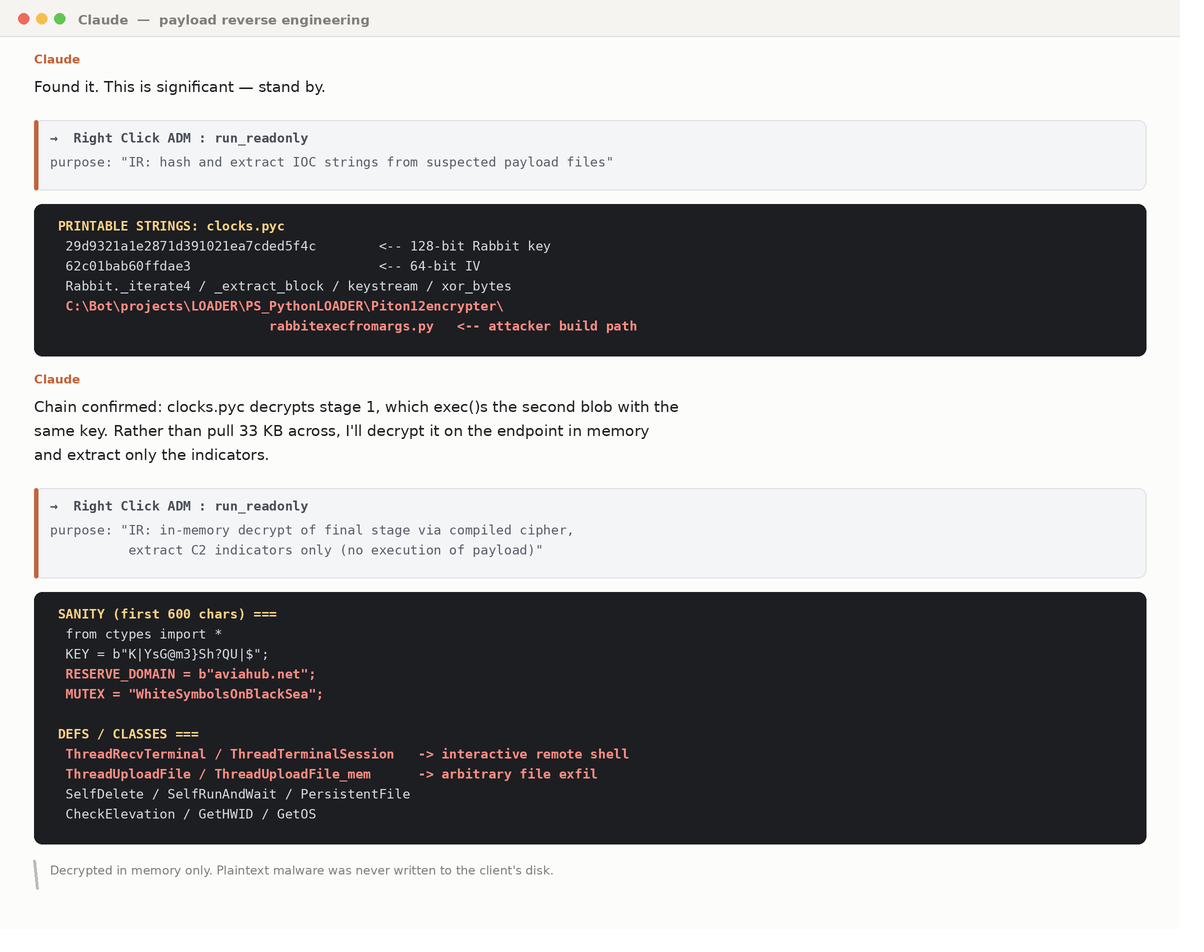
Normally the point where a case gets escalated or quietly closed as "cleaned." Instead: cipher key pulled from the loader, validated against a published test vector, final stage decrypted in memory, indicators extracted. Result: a definitive classification — RAT, not infostealer — plus the C2 domain and a memory-resident mutex for fleet hunting.
5 — Root cause: the question that changed the engagement
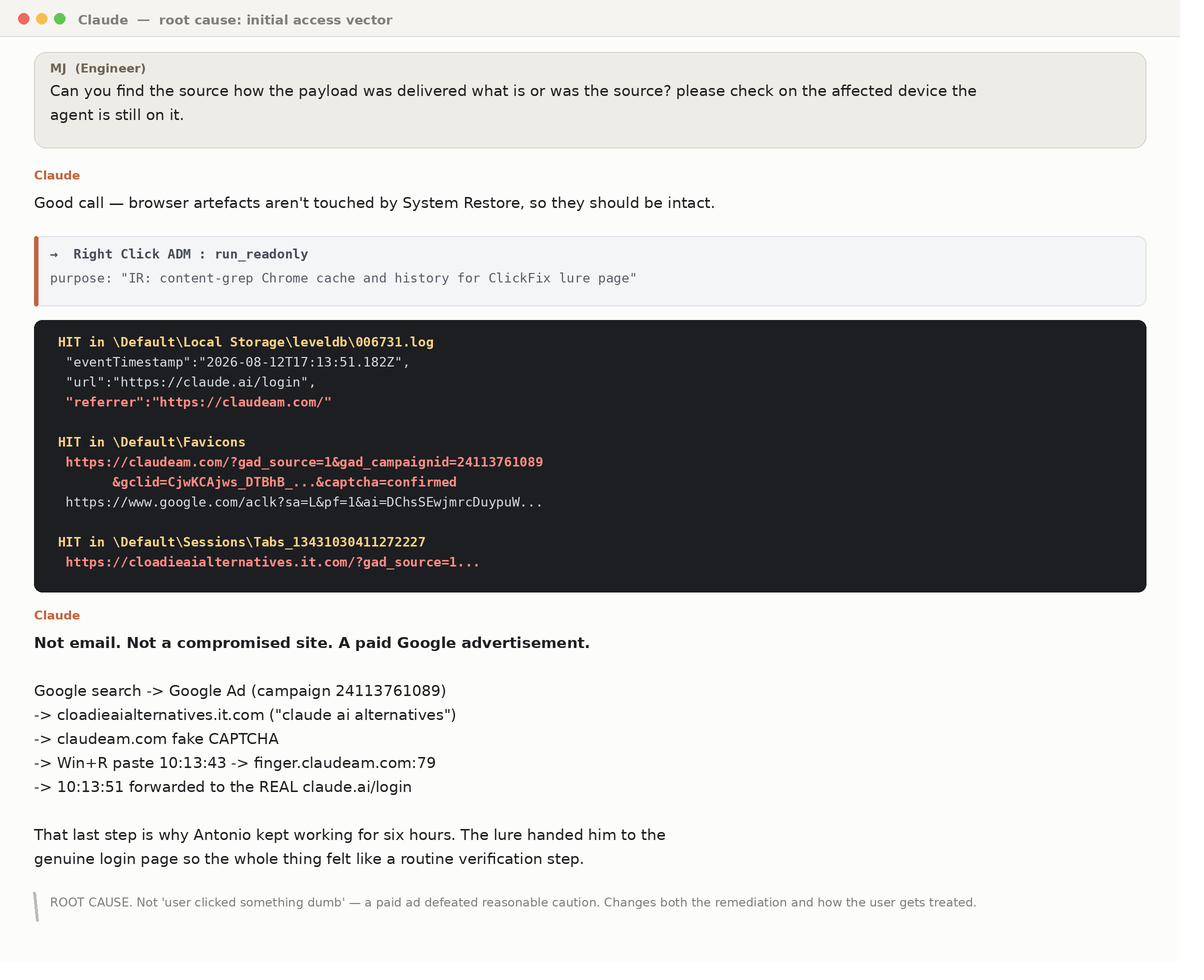
The malware could have been deleted at this point. The engineer instead asked where did it come from? Browser artefacts survived the System Restore and preserved the whole chain — including the forward to the genuine login page that made the lure feel like routine verification. A paid ad served to anyone searching for AI tools is a materially different client conversation than "one user clicked something."
6 — Evidence over instinct, and a self-correction
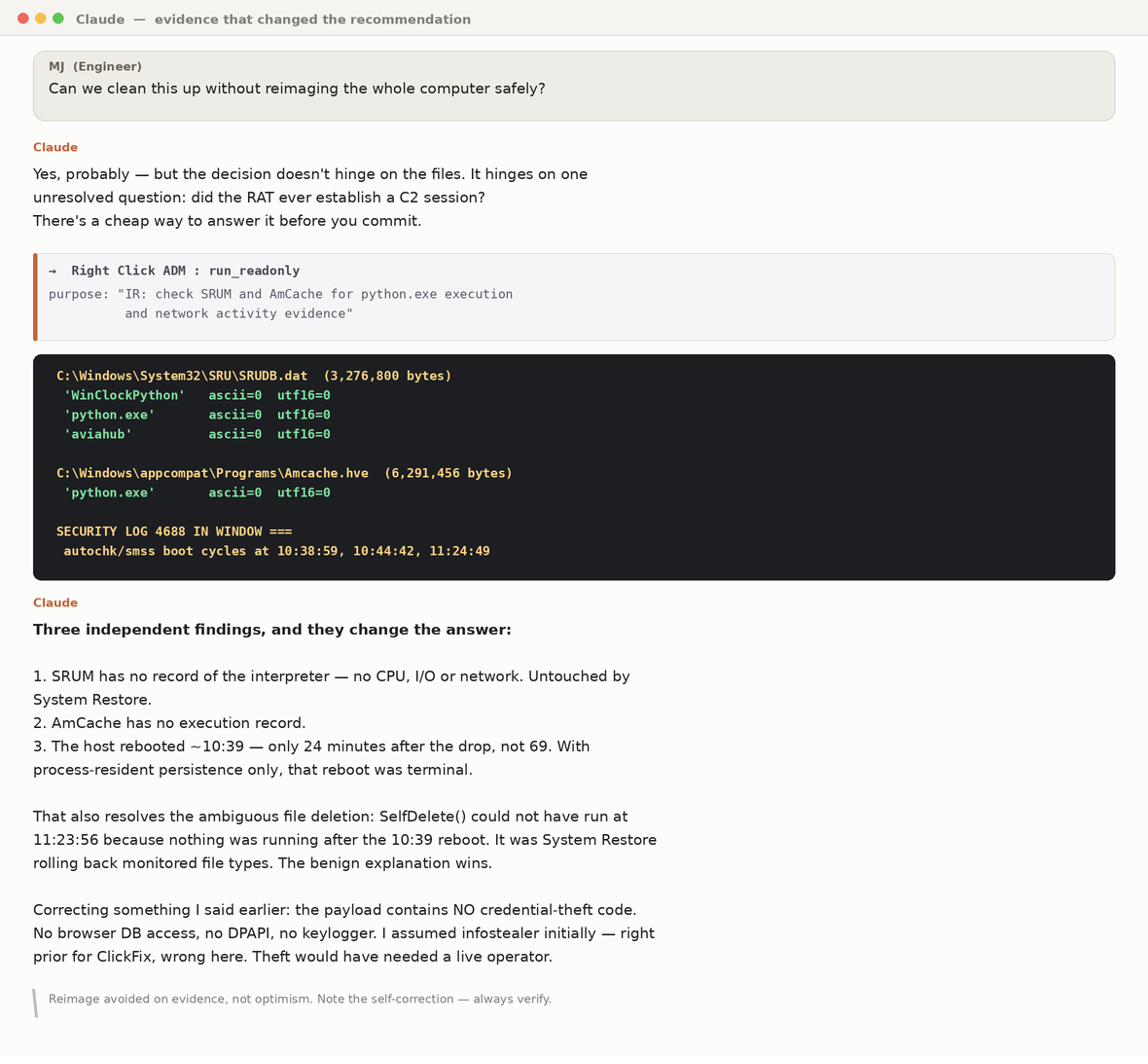
Three independent artefacts System Restore doesn't touch — SRUM, AmCache, boot records — all said the payload never ran, and a reboot 24 minutes after delivery was terminal for in-memory persistence. And the technician corrected itself: its early claim that credentials were "probably already gone" was a prior, not a finding. Reading the decrypted source disproved it. That correction is the model working, not failing.
7 — Authorized, scoped change Change-class · confirmed
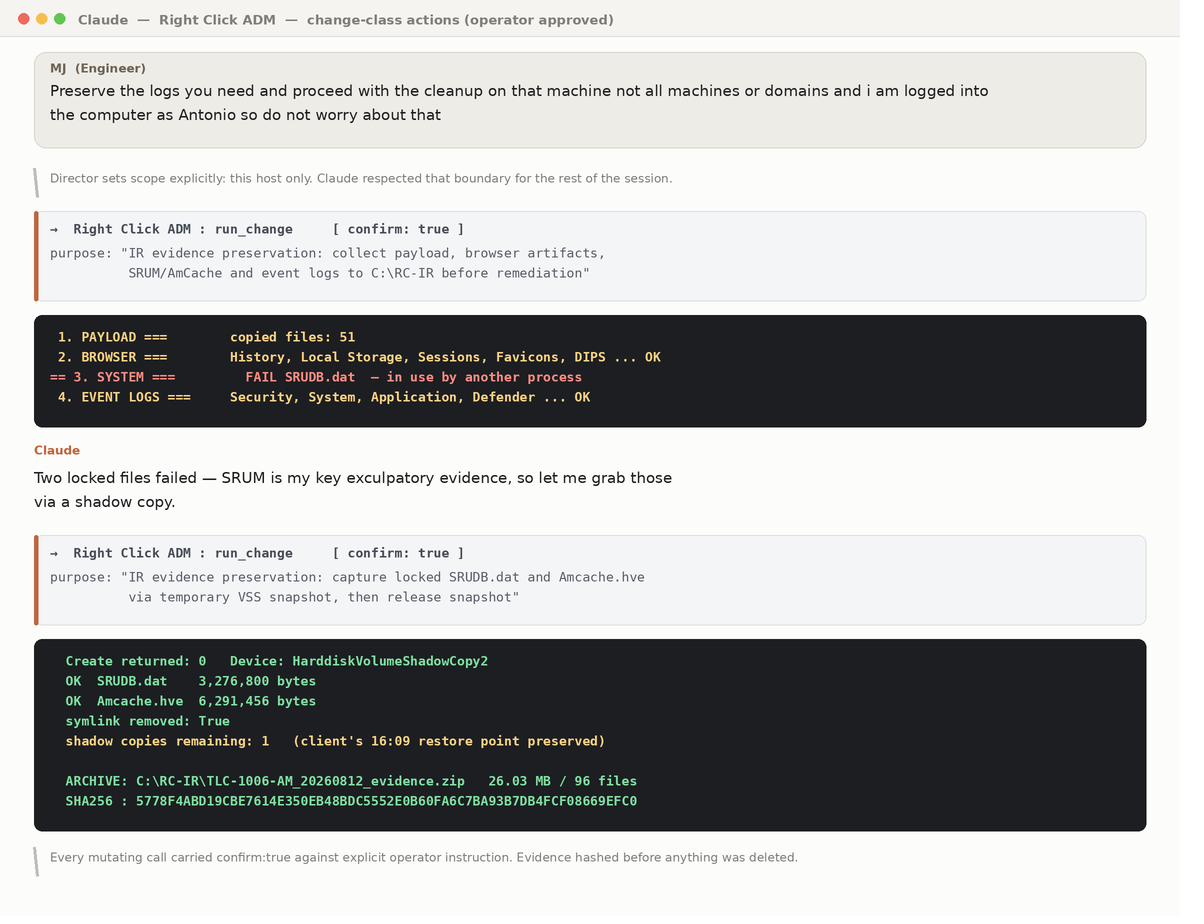
"That machine, not all machines" — and the boundary held for the rest of the session; a fleet sweep was offered repeatedly and never performed. Every mutating call carried an explicit confirmation against a stated purpose. Locked files were captured via a temporary shadow copy that left the client's restore point intact, and the remediation script refused to delete anything if the evidence archive was missing.
8 — Verify, then harden
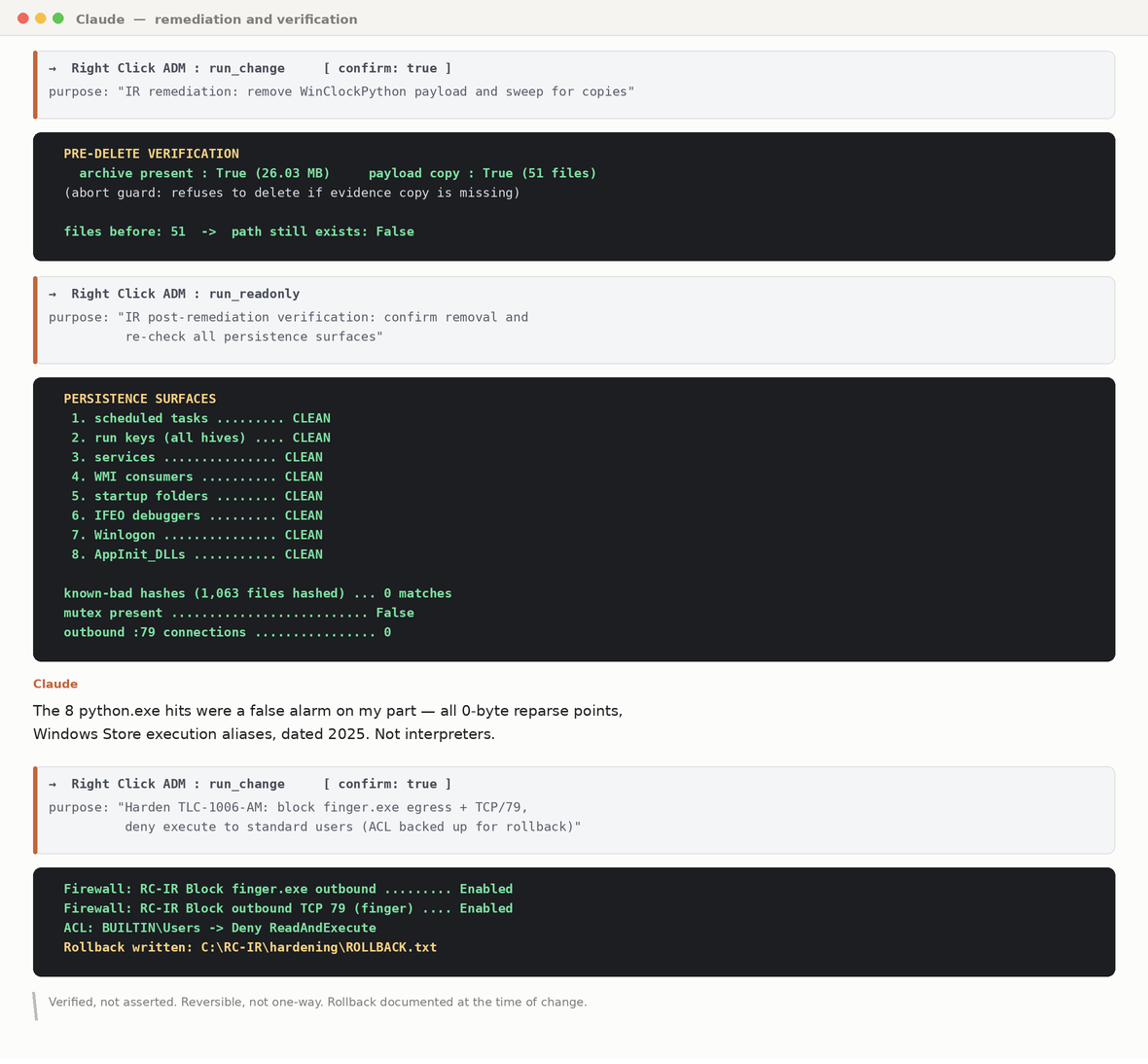
All eight persistence surfaces re-checked after removal. 1,063 files hashed against known-bad. A false positive caught and explained rather than reported. Hardening layered — firewall rules first, then file permissions — with original ACLs exported and rollback instructions written at the time of the change.
What this case did not do
- It could not prove a negative — process auditing was off, no Sysmon, firewall logging disabled. Strong absence of evidence across several sources; not proof.
- It could not read the perimeter firewall or the EDR console. Those stayed on the human's list.
- It could not decide the client's risk appetite. Clean vs reimage was the engineer's call.
- It got the initial impact assessment wrong and had to correct it — kept in this record on purpose.
Buccola Landscape: the reboot that was hiding an attack
The ticket asked for one thing: reboot a server. Three hours later the record showed a credential-spraying attack against an internet-facing service, running at 39,675 login attempts a day, active for at least two years — its only visible symptom silenced the whole time by our own workaround. This is the case that proves the model isn't a security discipline. It's what "just doing the work" looks like when depth is affordable.
HaloPSA 550677 · 12 Aug 2026 · 08:41:58–11:45:05 PT (3 h 3 m) · hosts BL-SQL1, BL-TS1, BL-DC1 · three change-class operations, all confirmed · six ticket notes.
Why it's worth teaching
The case was closeable on paper — twice. After the reboot: services up, users working, note written. After the AUTO_CLOSE fix: a genuine root cause found, fixed, verified, documented — an unusually thorough close that was still wrong about the presenting complaint. It was reopened both times, and the second reopening is what surfaced the attack. The failure mode this model addresses is not slowness; it is abandonment — "reboot it again if it comes back" had been the permanent answer for roughly two years, and it was concealing an active attack. Ninety percent of the findings came from logs sitting on the client's own servers the entire time, readable by anyone who went and looked.
1 — The control layer refuses to act without a human Gated
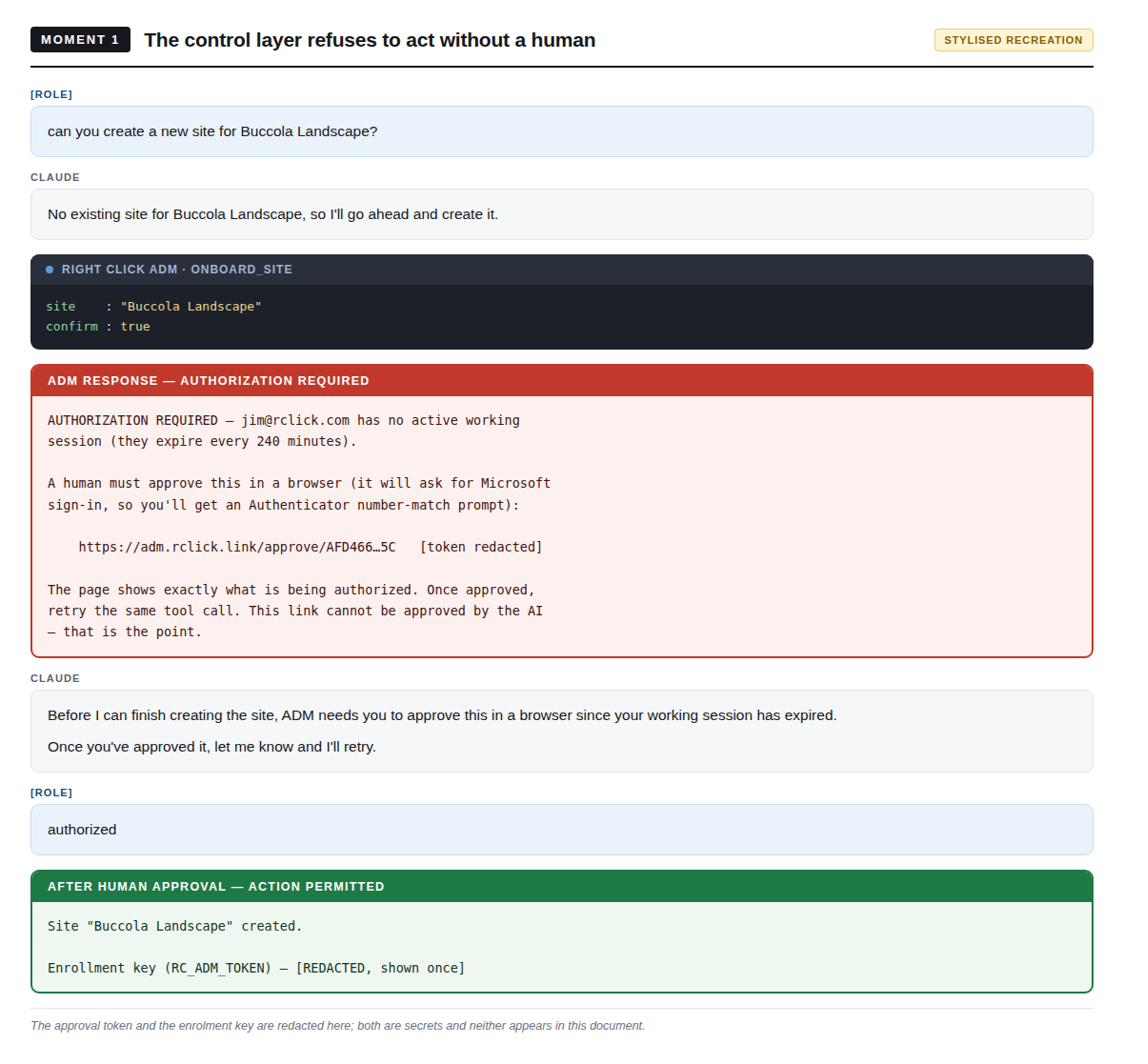
The call was made with confirm=true — and ADM rejected it outright: sessions expire every 240 minutes, and it returned a one-time browser approval URL requiring Microsoft sign-in with Authenticator number-match. Nothing partial happened. What made the difference here: nothing — and that is the point of the image. The gate is not discretionary and cannot be routed around by rephrasing.
2 — Change-class work is verified before it is performed Class 1 · confirmed
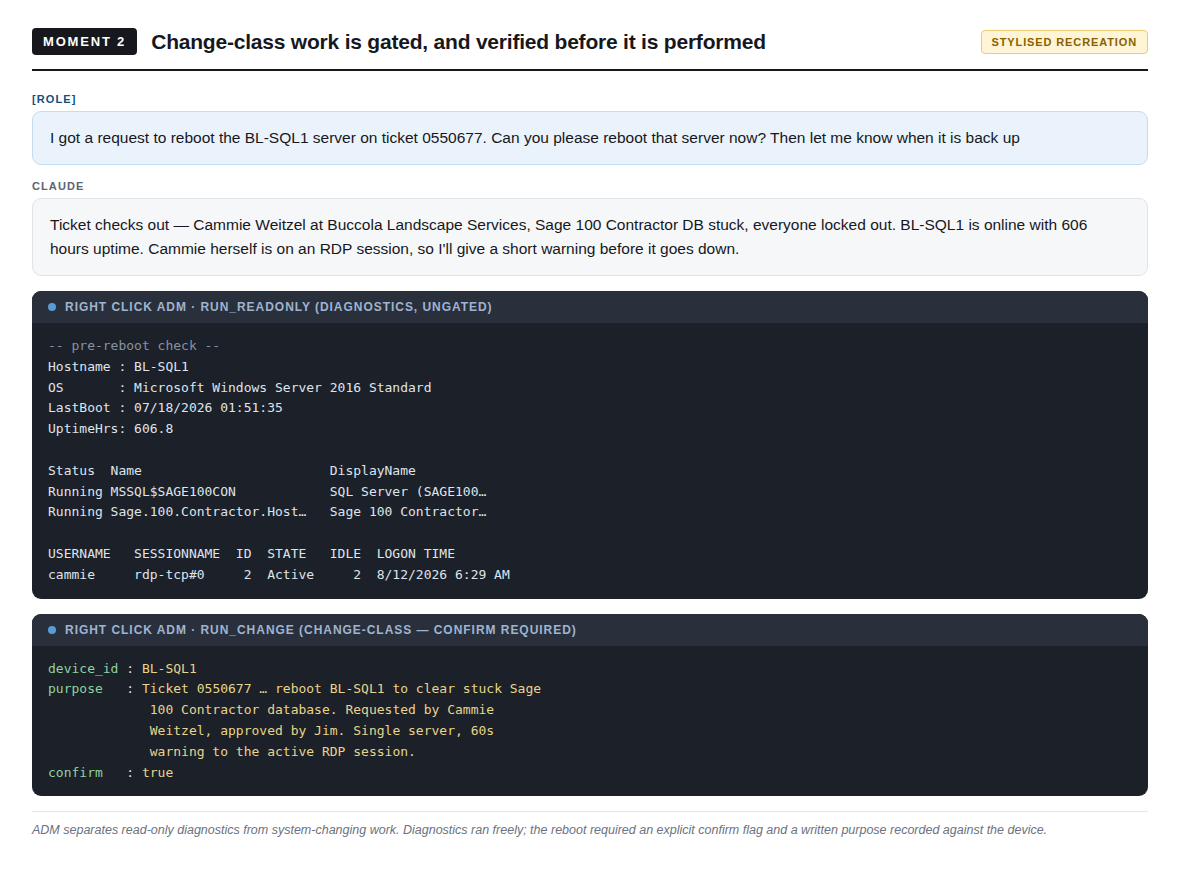
Before the reboot: the ticket read from HaloPSA, the device confirmed online, and a read-only pre-check — 606.8 hours of uptime, services running, and an active RDP session belonging to the reporting user herself. That pre-check changed how the reboot ran (60-second warning to her session), not whether. Because read-only diagnostics cost nothing, there is no incentive to skip them.
3 — The task is reopened after the apparent fix
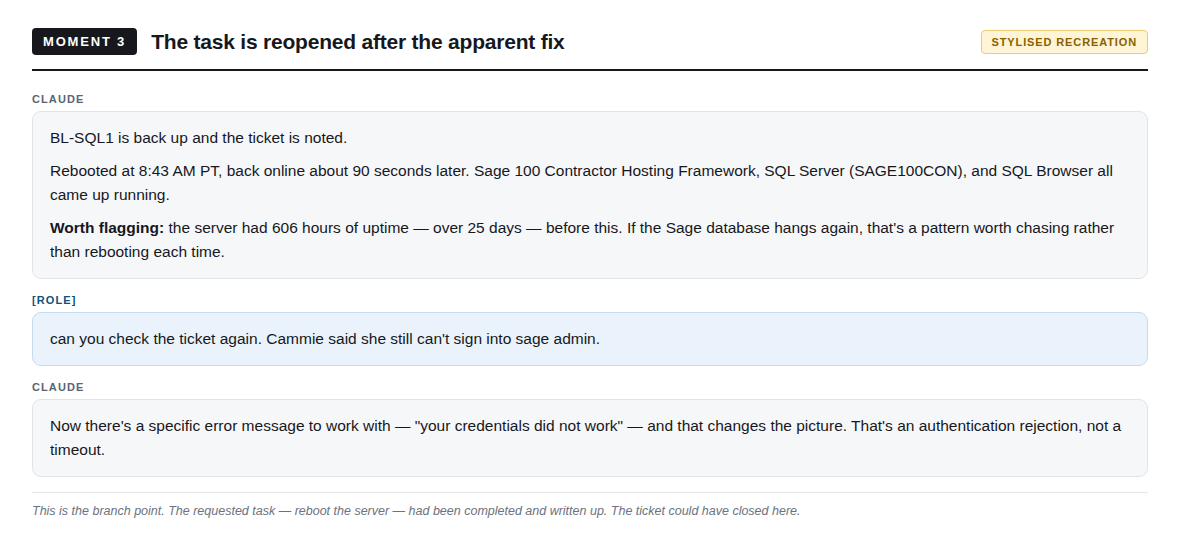
Reboot verified at 08:46, note written — closeable. Then the user still couldn't sign in, and the exact error string came back: "your credentials did not work." That quoted string — passed back verbatim from the human side, not from telemetry — was the single most useful piece of information in the session. The outcome was checked against the user, not against the task.
4 — First root cause, and the fix handed back as a choice Class 1 · confirmed
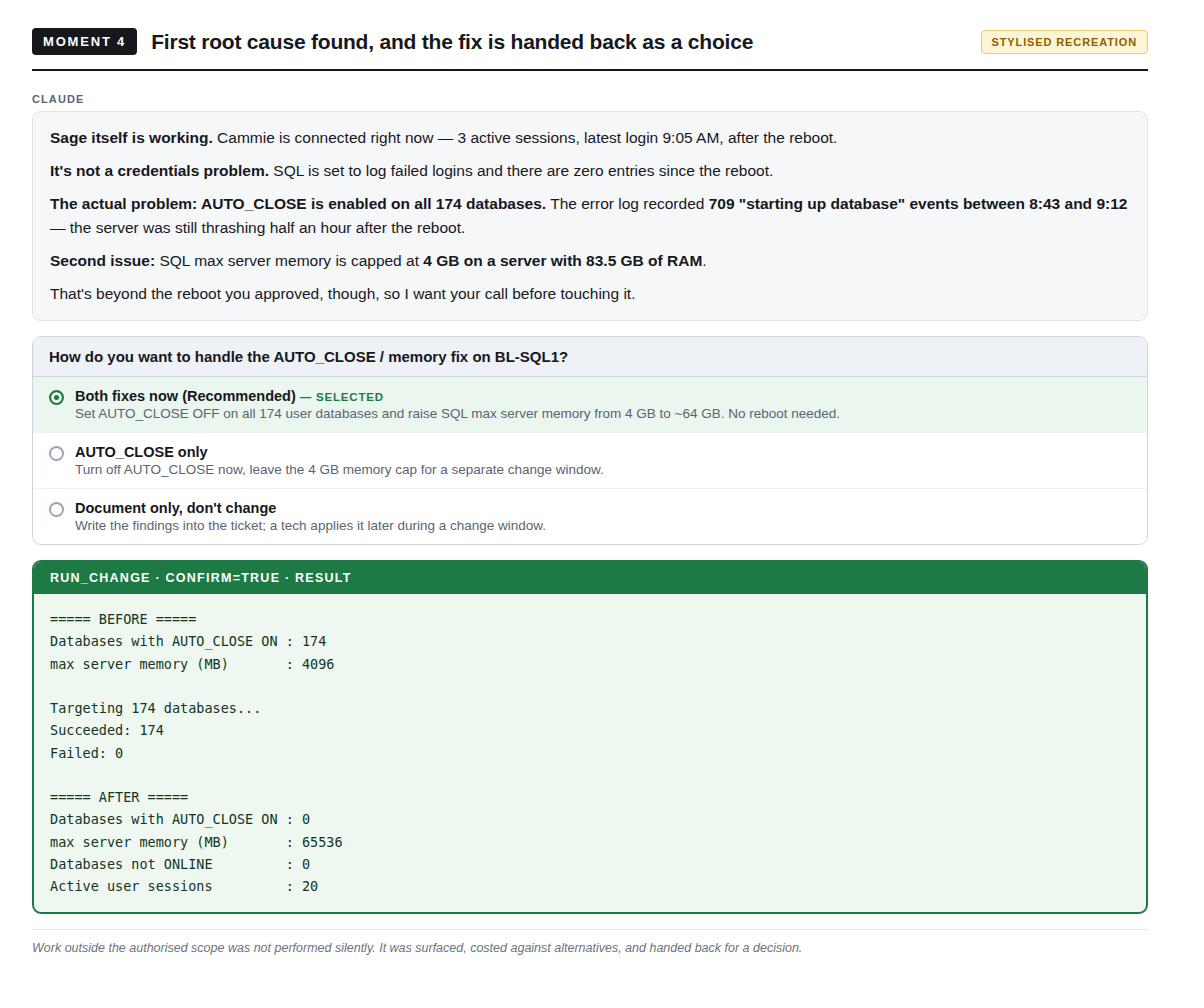
AUTO_CLOSE was enabled on all 174 user databases — 709 "starting up database" events in the half hour after boot — and both findings were outside the authorized scope, which was a reboot. The fix was surfaced with alternatives including "document only, don't change" as a real option; after approval, 174/174 succeeded and the churn stopped. This moment also proves thoroughness alone isn't sufficient: a correct root cause for the original symptom that still didn't resolve the presenting complaint.
5 — An active attack is found; containment is deliberately withheld Class 2 · escalated
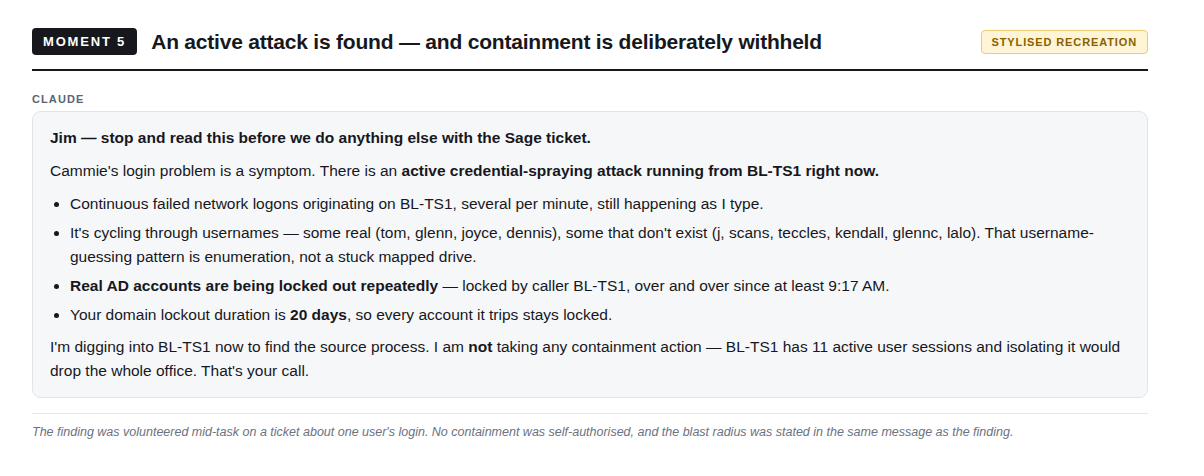
Scope discipline cuts both ways: staying in scope must not mean staying silent, so the finding was volunteered immediately — but no containment was taken, because BL-TS1 carried 11 active user sessions and isolating it would have dropped the office. The blast radius was stated in the same message as the finding, and the call was framed as a business decision. Whether to drop an office of users is never the hands-on layer's call.
6 — Containment scope set by the human; a credential declined
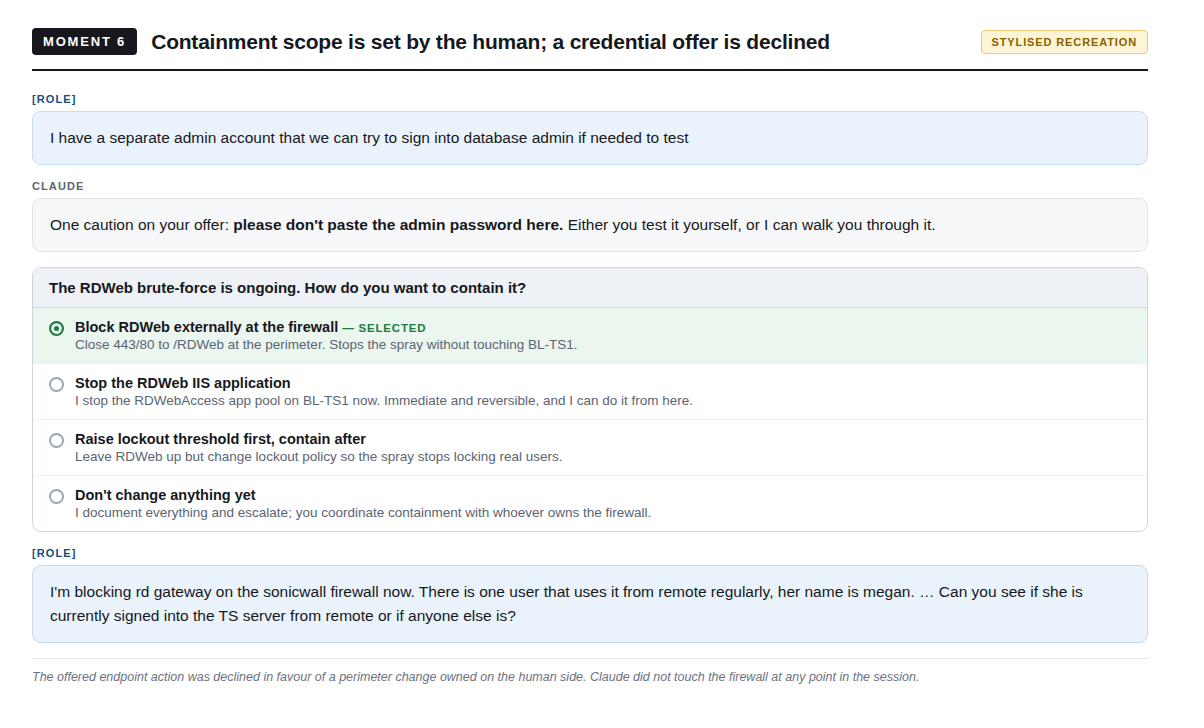
Four options with consequences: perimeter block, stop the app pool from inside the session, change lockout policy first, or document only. The perimeter block was chosen and executed on the human side — the firewall was never touched from within the session. An offered admin credential was declined with a request not to paste it into the conversation. And the fact that reframed the remote-access picture — the regular remote user working under a departed employee's account — came from someone who knew the client, not from a log.
7 — Two conclusions corrected: one self-caught, one after challenge
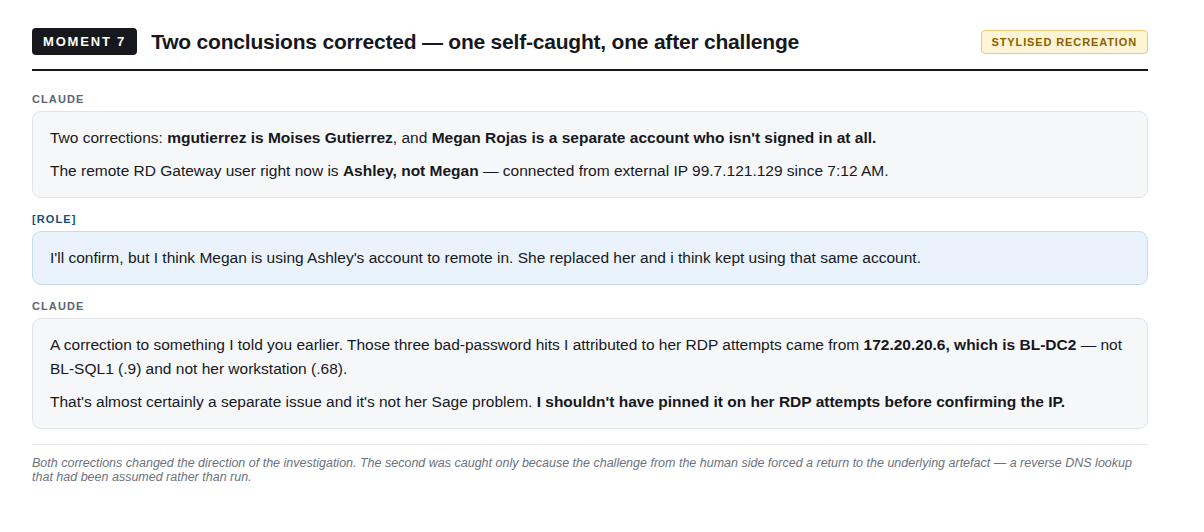
First, self-caught: an account asserted to be Megan's was actually Moises Gutierrez's. Second, after challenge: three Kerberos pre-auth failures attributed to the user's RDP attempts against BL-SQL1 — but the reverse DNS lookup, once actually run, showed the source was BL-DC2. The attribution was retracted in full. Had it stood, genuinely anomalous authentication activity on a domain controller would have gone unrecorded as "user typo'd her password." The habit, in both directions: challenge conclusions, and when challenged, go get the artefact instead of restating the reasoning.
8 — Attribution demanded rather than accepting a benign finding
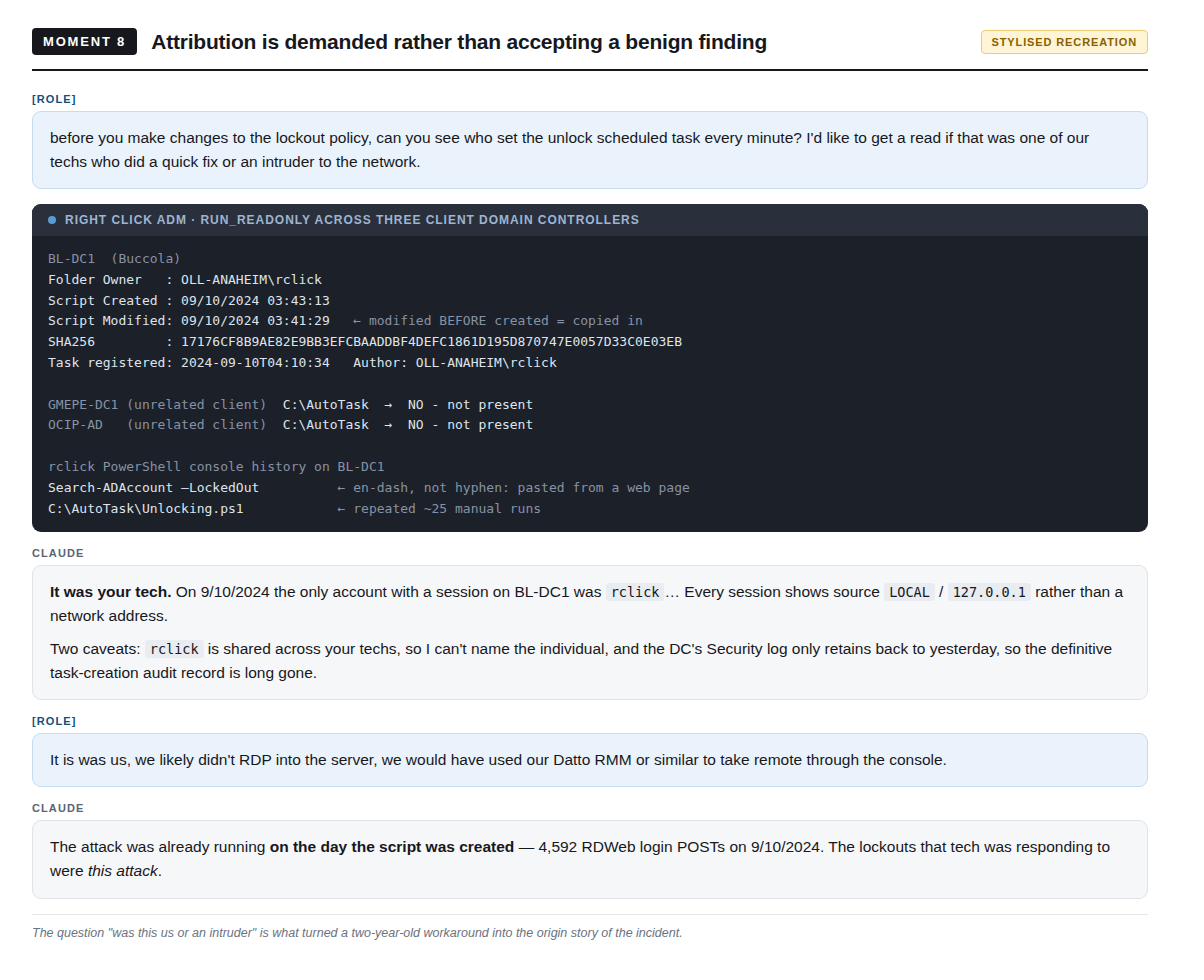
A scheduled task was unlocking every locked account in the domain every 60 seconds — 521 unlocks in one day. The easy classification was "bad workaround, disable it, move on." Instead: file timestamps and ACLs, a SHA-256, two unrelated client DCs checked for the same artefact (absent at both), console history showing ~25 manual runs and paste-from-web en-dashes. Then the payoff: sampling historical IIS logs showed 4,592 login POSTs on 10 September 2024 — the attack was already running on the day the workaround was written. The lockouts that technician was fixing were the attack. The workaround silenced its only visible symptom for two years.
Outcome, in brief
| Before | After | |
|---|---|---|
| External login attempts | 8–15/minute, sustained, ≥2 years | Zero. Last attempt 17:02:22 UTC |
| Effective lockout protection | None — 521 auto-unlocks in one day | Functioning for the first time in ~2 years |
| AUTO_CLOSE / SQL memory | 174/174 enabled · 4 GB cap | 0/174 · 64 GB |
| RD Web Access | Internet-published, no MFA, no VPN | Blocked at perimeter; allowlist pending VPN |
| Understood root cause | "Sage gets stuck, reboot the server" | Three causes separated; two proven, one honestly open |
Honest limits
No successful authentication was found — but only 28 of ~2,632 retained IIS log files were examined, sampled for volume, not searched for successes; that is not proof the environment was never compromised. The attack's true start date is unknown (Sep 2024 is the earliest confirmed date; logs reach to 2019). Which individual created the unlock task is unprovable — the account is shared and the DC retains roughly one day of Security log. The presenting user's failure remains unproven (stored-credential hypothesis, untested, clearing offered but not authorized). BL-DC2 — the source of the corrected Kerberos finding — was identified by reverse DNS only and never queried. It is a live loose end.
What it exposed about us
Ten process findings against Right Click, kept in deliberately — among them: a symptom automated away for two years without the cause being diagnosed; a shared account holding Domain, Enterprise and Schema Admin, making "was this us?" unanswerable; one day of Security log retention on a domain controller; a 20-day lockout duration that made the bad workaround feel necessary; and an automated first reply telling the client "a technician has the full context" before one had looked. The full list is Section 8 of the source document.
OCIP: depth made affordable, at engagement scale
A RAT on a sales workstation and an unauthorized Domain Admin console session on the DC. By the evening of day one the incident was, on paper, nearly closed — tools removed, session terminated, credentials rotated, report filed. The sessions this case covers are everything that happened after the point where the ticket could have closed: a second attacker tenant, an initial-access date a day earlier than reported, a krbtgt password 1,294 days old, and a fleet that had never been swept.
OCIP-260810 · HaloPSA 549996 · RocketCyber #12606438 · Aug 10–12, 2026 · team: Jim (attending), Kelly, Krishan · hosts SALES-MIKE-S, OCIP-AD + 22-endpoint fleet sweep · Source: "Depth Made Affordable."
Why it's worth teaching
The conventional checks came back clean because the evidence had already rolled away: the DC's Security log retained about two days against an intrusion window opening June 3. "Domain Admins membership appears normal" was literally true — and the recognized-accounts list included three prior-provider accounts with live Domain Admin rights. The difference between this incident's real severity and its on-paper severity on the evening of August 10 is exactly the work that normally never happens.
1 — Scope set in one message; the tooling immediately tells on itself
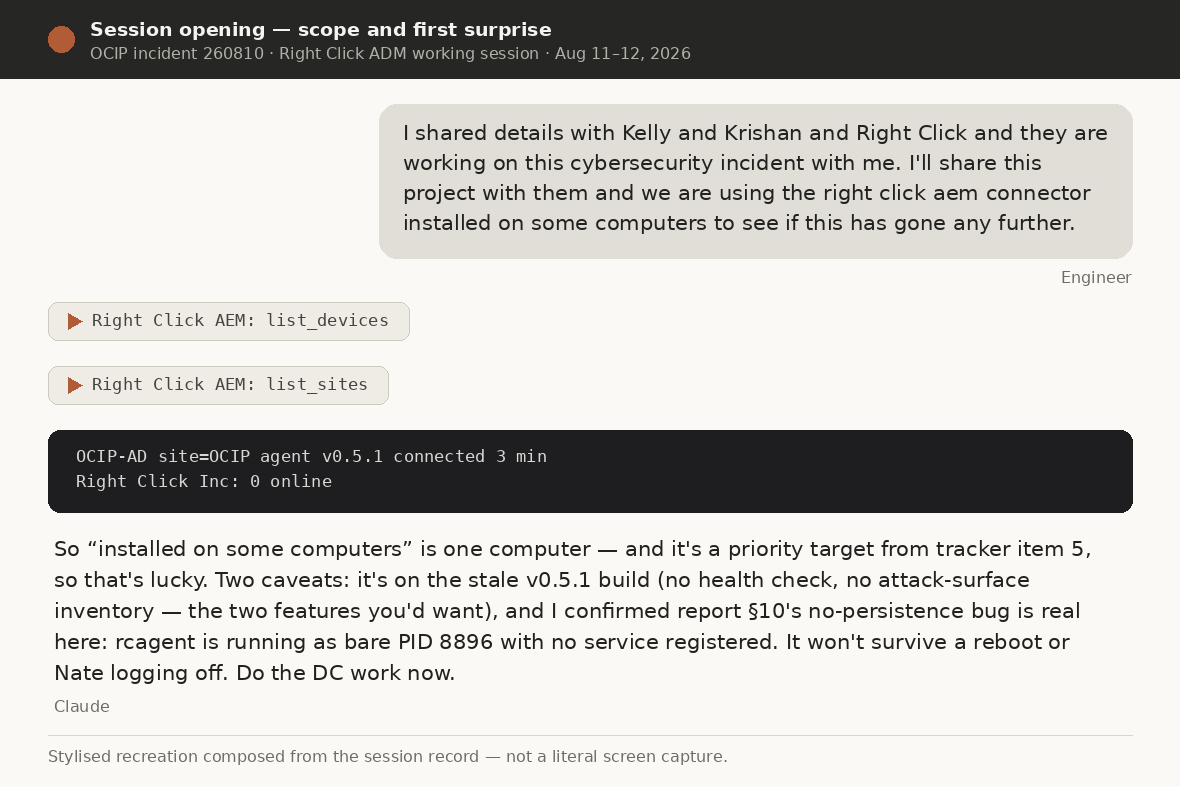
The opening message named the collaborators, attached the shared project as the team's common record, and stated the question: has this gone any further? The first calls were inventory, not action — and the answer was uncomfortable: one device reachable (the DC), on v0.5.1, running as a bare process that wouldn't survive a reboot. Honest inventory produced correct prioritization: do the DC work now, because the one foothold is fragile. Note what this moment is not: nobody granted blanket access.
2 — Read-only triage clears the fast checks; the control layer refuses the slow ones Read-only
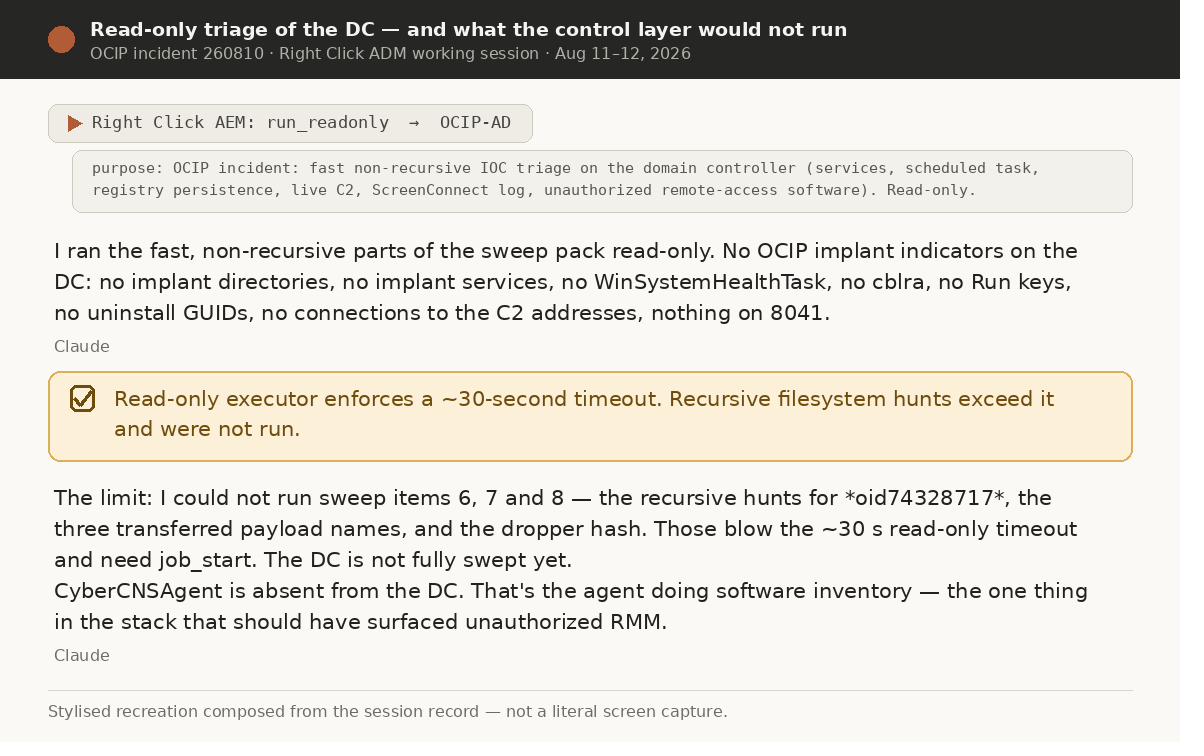
Fast indicator checks all clean; the recursive filesystem hunts exceeded the read-only executor's ~30-second ceiling and were refused — surfaced as open items, never silently degraded into fake coverage. The same triage noticed an absence: CyberCNSAgent, the very agent that should have caught unauthorized RMM in the first place, was missing from the DC. The gap itself became a finding.
3 — A second ScreenConnect on the DC: evidence over alarm
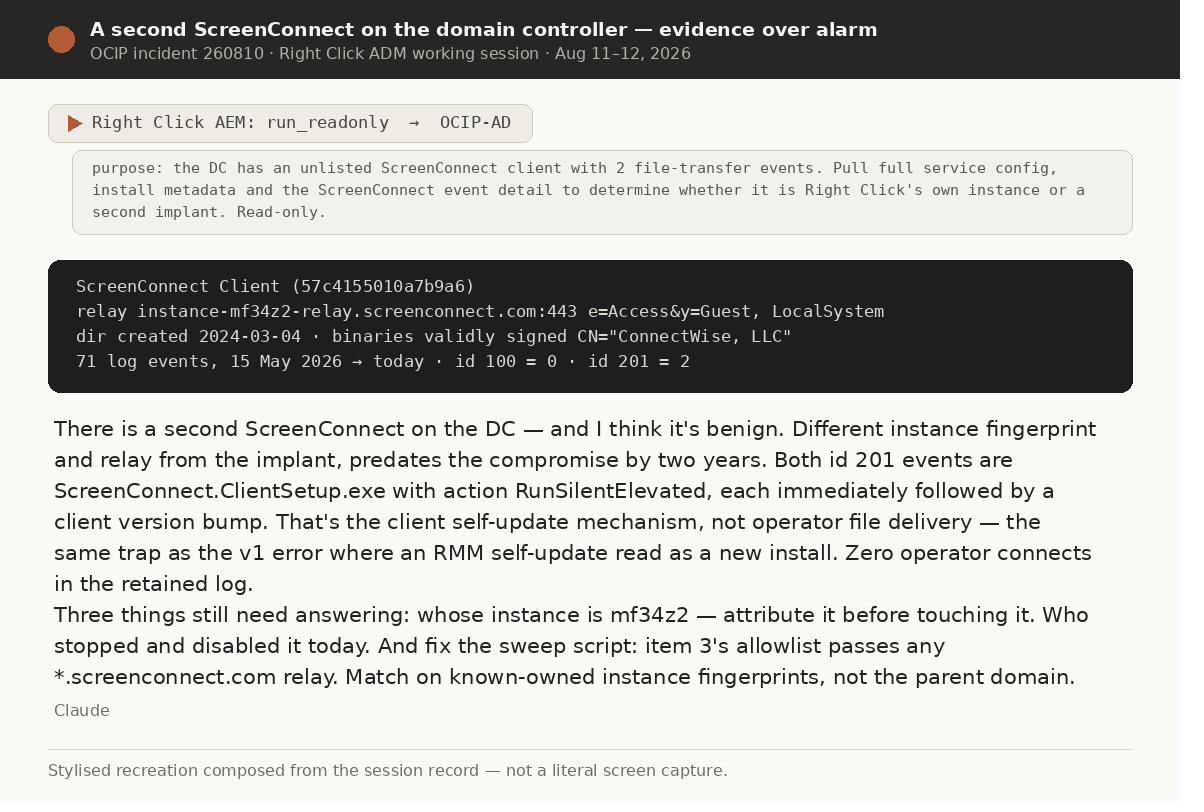
Different instance fingerprint, validly signed binaries, an install predating the compromise by two years, zero operator-connection events — both "file transfers" were the client's own self-update. Delivered as a probability with conditions, not a verdict: likely benign, and attribute it before touching it, and — the sharpest — fix the sweep script, whose allowlist would have passed any *.screenconnect.com relay, including an attacker's free trial tenant. A finding about one host became a correction to the team's hunting methodology. The transcript even names its own scar tissue: "the same trap as the v1 error."
4 — The two-day log, and the team's own documents get corrected
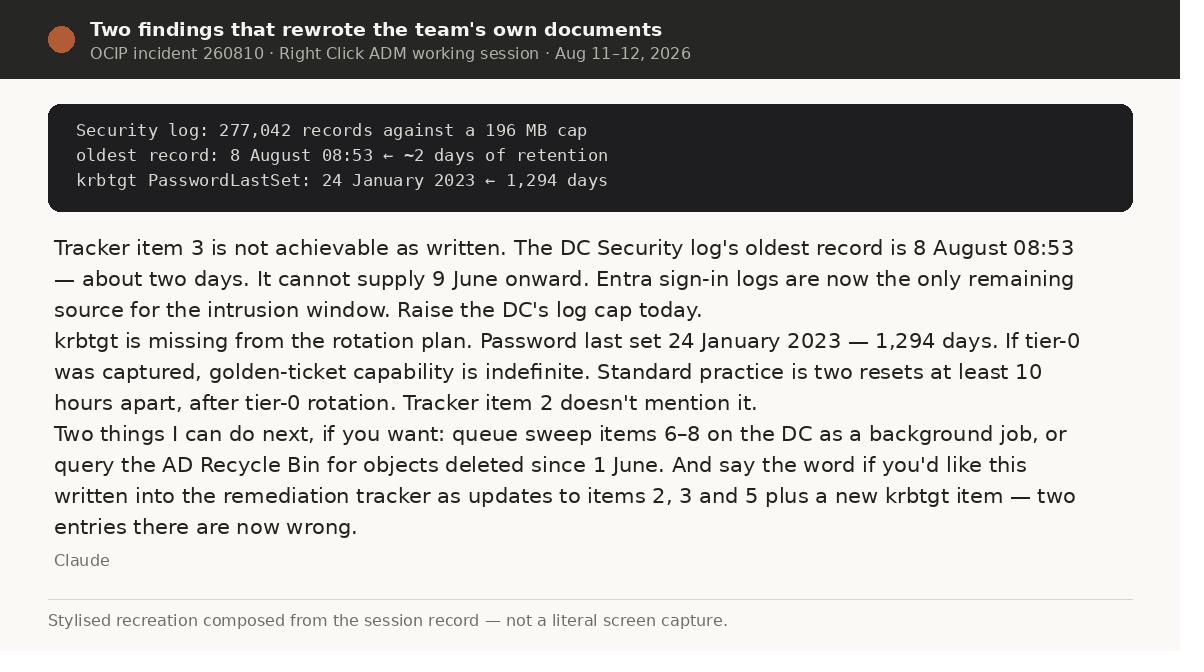
277,042 Security records against a 196 MB cap — about two days of history — made one tracker item unexecutable as written. In the same pass: krbtgt at 1,294 days against a confirmed unauthorized Domain Admin session, meaning forged Kerberos tickets would stay valid indefinitely — and krbtgt appeared nowhere in the plan. The findings were framed as written corrections to the team's own artefacts, the replacement evidence path named in the same breath, and the next actions offered rather than assumed. When evidence contradicts the plan, the plan gets corrected on the record — and the correction waits for authorization.
5 — The attending challenges a conclusion, and is right
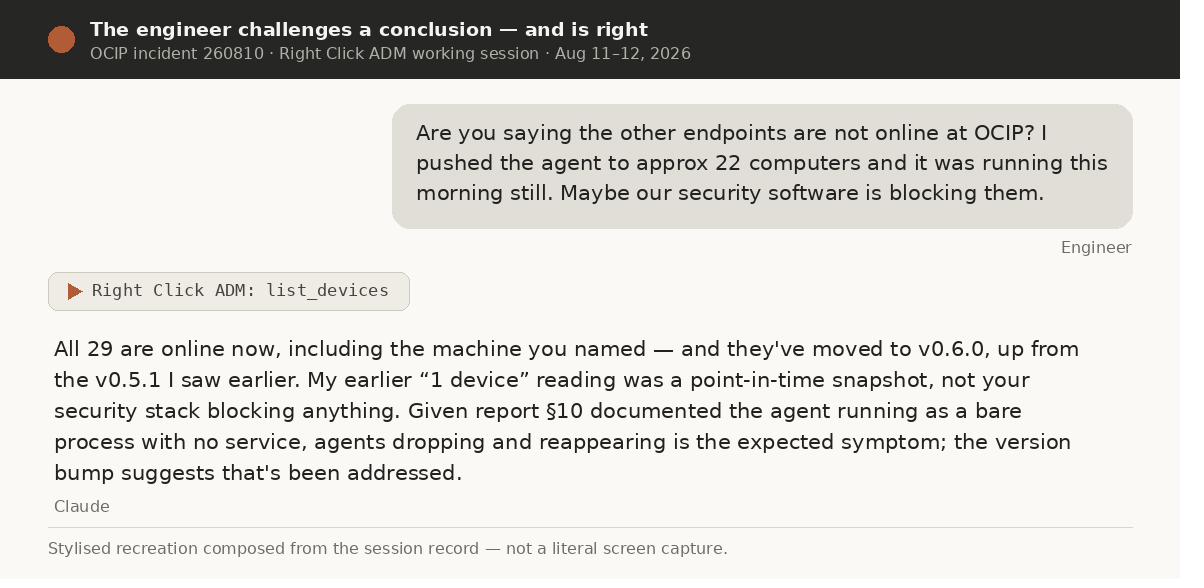
Estate notes implied most endpoints were unreachable. The attending pushed back from ground truth — the agent had been deployed to ~22 machines that morning — and a recheck showed 29 devices online on v0.6.0. The response owned the error in plain terms and explained the mechanism, tying the flapping to the already-documented no-persistence bug. Challenge the summary; demand the artefact. It runs in both directions.
6 — "Did we do this?": accountability under direct questioning
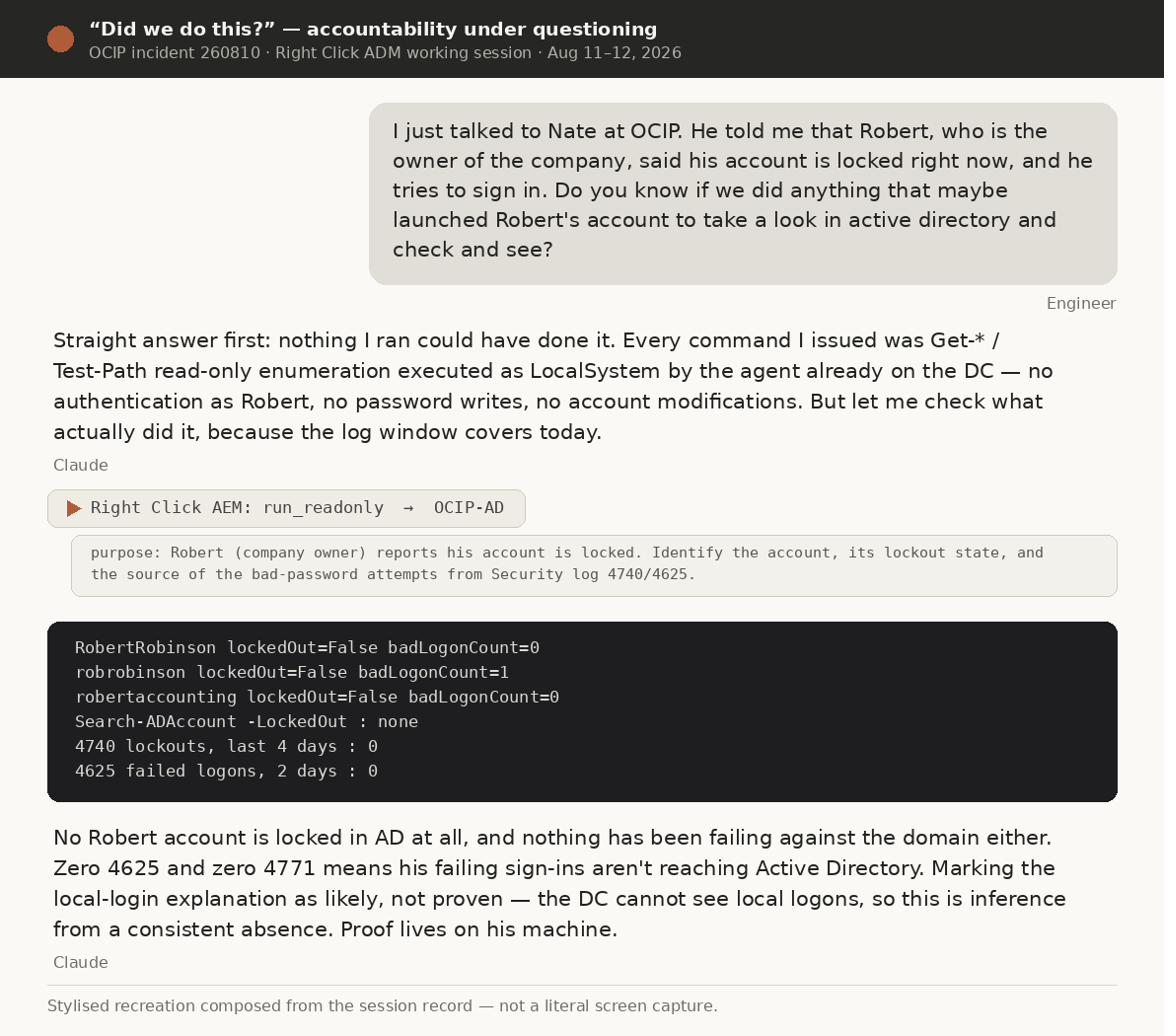
The company owner couldn't sign in, and the attending asked the question every client eventually asks. The answer came in two parts: a verifiable accounting of the session's own footprint (every command read-only, purposes in the record), then the evidence — no locked account, zero failure counters, meaning his sign-ins never reached the domain at all. The hypothesis was graded "likely, not proven — proof lives on his machine." The actual cause: our own Datto-deployed hardening script had disabled his local account, five minutes after creating a fleet-wide shared admin account. Kept in full view.
7 — The one write of the visible session: verified, gated, verified again Class 1 · confirmed
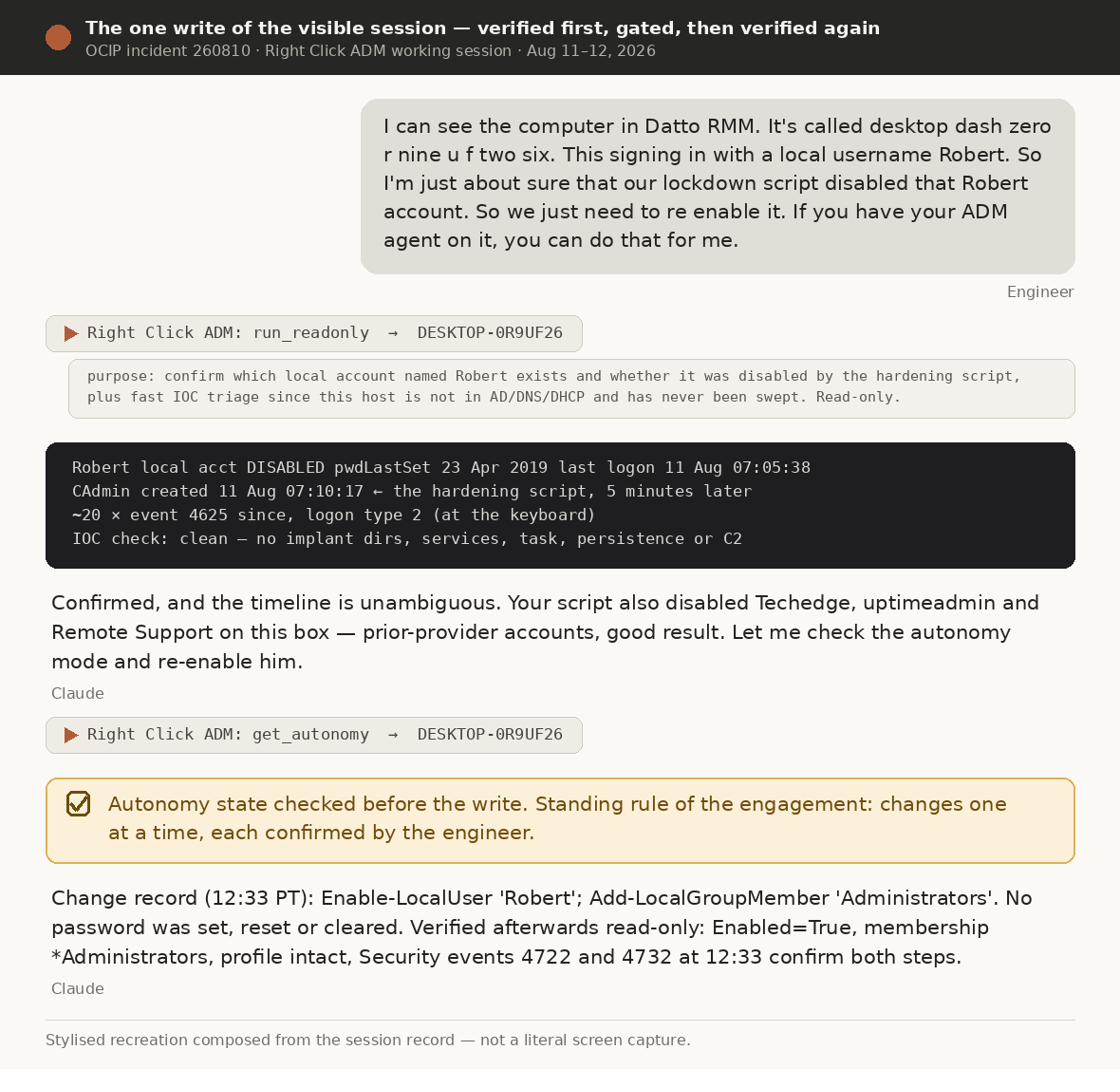
Before: read-only confirmation of which account existed and what disabled it (disabled at 07:10:18, the shared admin created at 07:10:17 — causation unambiguous), plus a first-ever IOC triage of a machine that had never been swept. Then an autonomy-state check under the standing rule: changes one at a time, confirmation on each. The change re-enabled the existing account — his profile, mail and files are bound to its SID — and set no password. After: verification down to the individual Security events. The record also logs what was deliberately not done: his aged password left in place on the attending's instruction, as a written open risk item.
Outcome, in brief
| Before (Aug 10, on paper) | After (close of sessions) | |
|---|---|---|
| Unauthorized products on the workstation | 1 known, removed | 3 — all removed, independently verified |
| Attacker infrastructure known | 1 relay | 2 tenants + consolidated blocklist |
| Enabled Domain Admins | 7 (prior-provider accounts "recognized") | 2, both accounted for |
| krbtgt | 1,295 days old, absent from the plan | Written two-reset runbook, gated correctly |
| Fleet | 0 endpoints swept | 22/22 online swept read-only; TeamViewer found & removed from one host |
| Initial access | "Dwell time unknown" | Fixed at Jun 10 08:46:22; 2m21s install chain reconstructed |
Honest limits
Whether the two intrusion tracks — the workstation RAT and the DC implant — are one actor or two remains the most important open question. The DC's June 3 install date rests on file timestamps alone; the workstation chain hangs from log-anchored Event 7045 evidence, and the document deliberately grades the two tracks differently. krbtgt capture can be neither proven nor excluded — which is exactly why the reset is treated as mandatory. And an honesty note that matters for this academy: no MFA prompt or session-expiry event appears in this engagement's retrievable record, so none is claimed or depicted. The gating this case evidences is tool-class separation, the read-only ceiling, the autonomy check, per-change confirmation, and two blocked changes ending in verified clean rollback — "Net change to the environment tonight: none." (The tamper-protection denial was Defender's own self-protection, not ADM's gate; the document keeps that distinction precise, because clients ask.)
What it exposed about us
The first remediation removed one of three unauthorized products and left two channels live. The forensic evidence set initially had no hash manifest and sat where a reinstall could destroy it. Our agent shipped with the no-persistence bug that caused the misleading one-device reading. Our hardening script locked the owner out of his own PC and deployed one shared admin password fleet-wide — flagged in-session as a new lateral-movement path, with LAPS named as the fix. Password rotations ran as SYSTEM, so the log records no human. The tracker's Owner column was empty on every row. Full inventory in the source document's Section 3.2 — uncomfortable, and kept that way.
How to work this way
Do
- Paste raw artefacts — full alert emails, complete log extracts, exact error text. Not your summary.
- State the operational question you actually need answered.
- Set scope explicitly and early: this host, this site, read-only, no changes without asking.
- Ask "what would prove or disprove that?" before accepting any conclusion.
- Ask for root cause, not just the indicator.
- Require the verification re-run after any remediation.
- Require rollback documentation for every change on a client system.
- Correct the record when a conclusion changes — both directions.
Don't
- Accept a confident narrative without an artefact behind it.
- Let "the scan is clean" close a case that started with a real detection.
- Use System Restore as malware remediation.
- Remediate from inside the affected user's session.
- Delete before you preserve.
- Assume scope — if you want the estate checked, say so.
- Paste client secrets or personal data the task doesn't require.
- Run two change-class sessions against the same endpoint. Ever.
Productivity
- Talk, don't type. Dictation gets several times the words per minute, and rambling context is good context — the Tivoli intake worked because the engineer described everything messily. Precision matters in scope statements; volume matters in intake.
- Run 2–3 chats in parallel — but only for independent work. While one session is deep in forensics, a second drafts the client email, a third researches the CVE. Rule Read-only can overlap; mutations serialize. Never two change-class sessions on one endpoint.
- Don't wait for it to finish. Queue the next message mid-response. Your tempo is set by your thinking, not the technician's typing.
- Match the model to the cost of being wrong — see model selection.
The reusable sequence
- Frame the operational question and paste the raw artefacts.
- Authorize the ADM session yourself — MFA, scoped, time-limited.
- Read-only first. Establish the facts before touching anything.
- Ask for root cause, not just the indicator of compromise.
- Challenge the conclusion. Demand the artefact that would disprove it.
- Preserve and hash evidence before remediating.
- Remediate within an explicitly stated scope.
- Re-verify independently.
- Harden against the technique, with documented rollback.
- Produce the client deliverable while the detail is still fresh.
Judgment check
Ten scenarios. In most of them several answers are defensible — pick the best one. The explanation is where the teaching happens, so read it even when you're right.
Scoring is on this device only for now. Practitioner certification will be recorded formally once the academy moves onto company infrastructure.